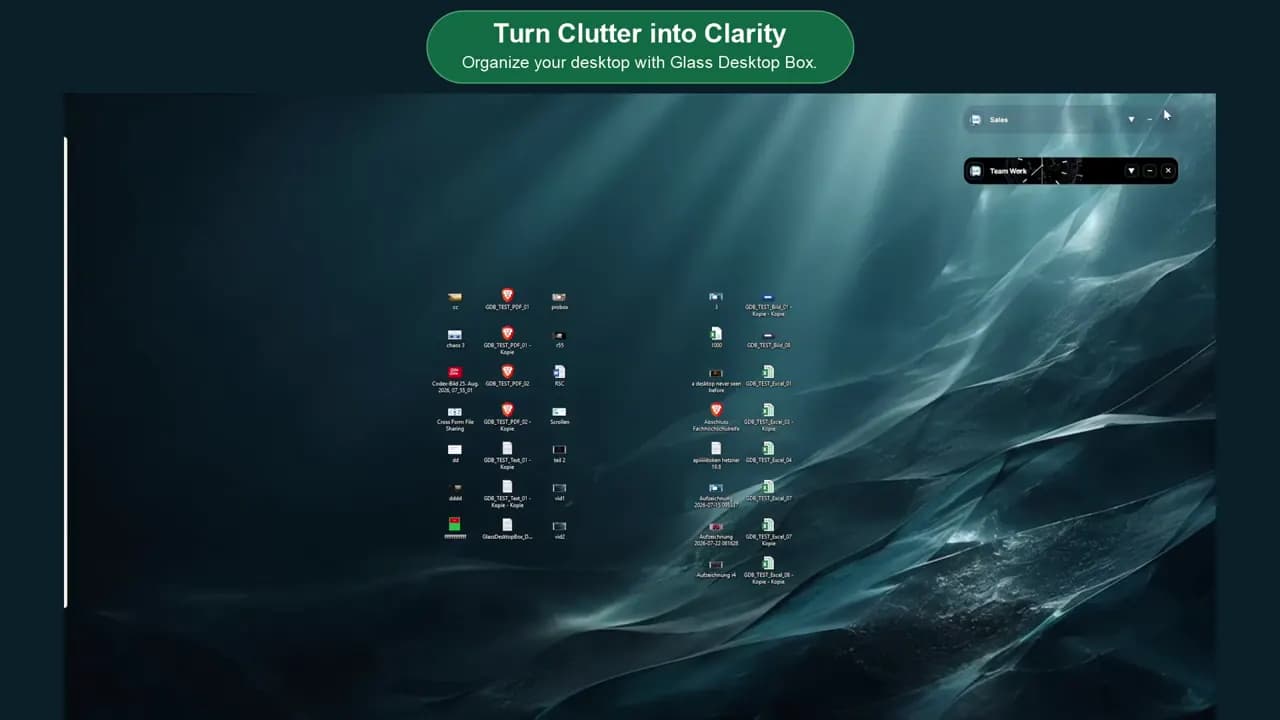
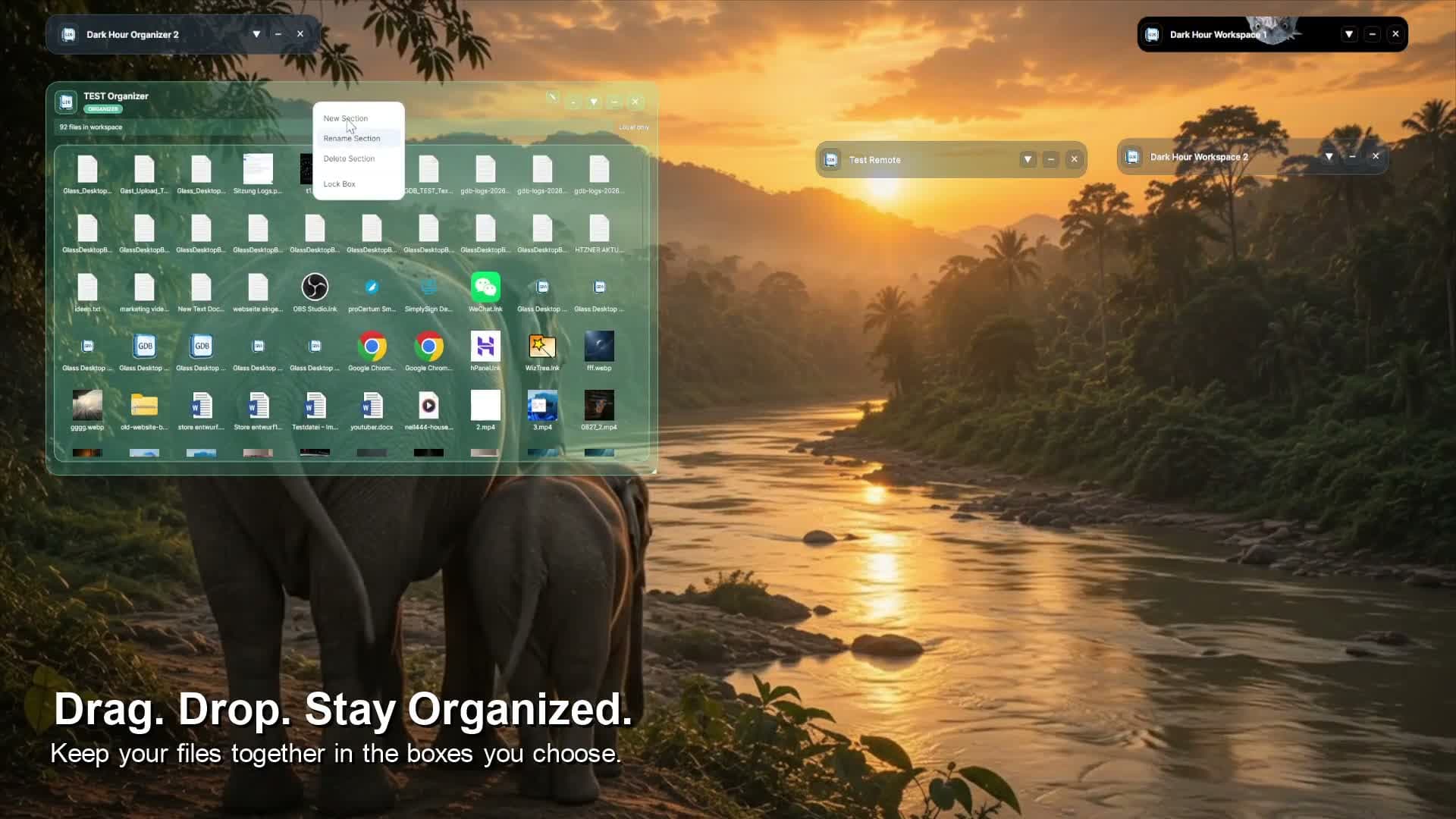
Visual Windows workspace with integrated file and folder transfer

Visual Desktop Organizer and Cross-Platform File Sharing for Windows

Organize local files in visual Boxes and share complete Boxes with their folder structure intact.

View plans & download

All features shown are included in Light, Starter and ProBox / ProBox Duo.

PLANS

Start simply. Grow flexibly.

Light

Light – Everything included

For your personal desktop and occasional file sharing.

Your Windows PC becomes a cross-platform file hub.

  • Share complete folders and organized structures with one click
  • Connect Windows with Mac, Linux, iPhone, iPad and Android
  • Send and receive files between Windows, iPhone, iPad, Android, macOS and Linux through a browser invitation—without installing Glass Desktop Box on the guest device.
  • Choose which Workspace Boxes you share · Guests need no account for file sharing
  • Chat during live file sharing
  • Direct, protected P2P transfers do not use your relay allowance.
  • 1 GB relay per month per licence

Your desktop – as individual as you

  • Over 230 animations, including 12 live clocks
  • Over 500 background images
  • Animated or static Boxes and backgrounds
  • Use your own images, photos and suitable videos
  • Freely adjust colours and transparency
  • Unlimited Boxes and sub-Boxes – for countless possibilities
  • Visual desktop organization
  • Selection Tabs and folder linking
  • PIN-protected boxes
  • Keep notes directly in your boxes

Also included

  • Application interface in 16 languages
  • Feature updates during the paid service period

Light: Not included: ProBox collaboration, custom branding and LAN/intranet operation.

Twelve months online – then you decide

No subscription or automatic renewal. Monthly equivalent: price ÷ 12, not monthly billing.

The one-time purchase includes twelve months of online services starting with each licence’s first successful activation, not purchase. Each ProBox Duo licence starts independently. The first activation is recorded; reactivation does not restart the term. There is no automatic renewal or further charge, and no cancellation is needed to prevent renewal. Continued online use requires a voluntary new purchase with its price and service period shown beforehand.

Files, Boxes and settings stay locally on your computer and remain usable offline. Shared files go only to your chosen recipients, directly via P2P or through a relay when needed; no permanent cloud file storage.

Online features end after twelve months without another charge. Your activated local version remains usable within the agreed scope. You can extend online services voluntarily with a new purchase.

1 GB / month – 12 GB per year

1 GB relay per month per licence

Each licence includes 1 GB of relay file transfers per month. The 12 GB per year is the sum of twelve monthly allowances, not a freely usable annual pool. You cannot use all 12 GB in a single month. ProBox Duo provides a separate monthly allowance for each of its two licences.

Direct, protected P2P transfers do not use your relay allowance.

Available now

€11.99 net

Equivalent to just €1.00 net per month

Light – One-time purchase including 12 months of file sharing and updates

One-time purchase including 12 months of file sharing and updates

€11.99 net

The one-time purchase includes twelve months of online services starting with each licence’s first successful activation, not purchase. Each ProBox Duo licence starts independently. The first activation is recorded; reactivation does not restart the term. There is no automatic renewal or further charge, and no cancellation is needed to prevent renewal. Continued online use requires a voluntary new purchase with its price and service period shown beforehand.

Your file transfer allowance per licence

1 GB relay per month per licence

Direct, protected P2P transfers do not use your relay allowance.

Files are not permanently stored in the cloud.


Integrated browser-based file transfers.

Starter

Starter – Everything included

For personal and business use with a larger monthly file transfer allowance.

Your Windows PC becomes a cross-platform file hub.

  • Share complete folders and organized structures with one click
  • Connect Windows with Mac, Linux, iPhone, iPad and Android
  • Send and receive files between Windows, iPhone, iPad, Android, macOS and Linux through a browser invitation—without installing Glass Desktop Box on the guest device.
  • Choose which Workspace Boxes you share · Guests need no account for file sharing
  • Chat during live file sharing
  • Direct, protected P2P transfers do not use your relay allowance.
  • LAN / Intranet Operation
  • 5 GB relay per month per licence

Your desktop – as individual as you

  • Over 230 animations, including 12 live clocks
  • Over 500 background images
  • Animated or static Boxes and backgrounds
  • Use your own images, photos and suitable videos
  • Freely adjust colours and transparency
  • Unlimited Boxes and sub-Boxes – for countless possibilities
  • Visual desktop organization
  • Selection Tabs and folder linking
  • PIN-protected boxes
  • Keep notes directly in your boxes

Also included

  • Application interface in 16 languages
  • Feature updates during the paid service period

Starter: Not included: ProBox collaboration and custom branding for remote sharing.

Twelve months online – then you decide

No subscription or automatic renewal. Monthly equivalent: price ÷ 12, not monthly billing.

The one-time purchase includes twelve months of online services starting with each licence’s first successful activation, not purchase. Each ProBox Duo licence starts independently. The first activation is recorded; reactivation does not restart the term. There is no automatic renewal or further charge, and no cancellation is needed to prevent renewal. Continued online use requires a voluntary new purchase with its price and service period shown beforehand.

Files, Boxes and settings stay locally on your computer and remain usable offline. Shared files go only to your chosen recipients, directly via P2P or through a relay when needed; no permanent cloud file storage.

Online features end after twelve months without another charge. Your activated local version remains usable within the agreed scope. You can extend online services voluntarily with a new purchase.

5 GB / month – 60 GB per year

5 GB relay per month per licence

Each licence includes 5 GB of relay file transfers per month. The 60 GB per year is the sum of twelve monthly allowances, not a freely usable annual pool. You cannot use all 60 GB in a single month. ProBox Duo provides a separate monthly allowance for each of its two licences.

Direct, protected P2P transfers do not use your relay allowance.

Available now

€22.99 net

Equivalent to just €1.92 net per month

Starter – One-time purchase including 12 months of file sharing and updates

One-time purchase including 12 months of file sharing and updates

€22.99 net

The one-time purchase includes twelve months of online services starting with each licence’s first successful activation, not purchase. Each ProBox Duo licence starts independently. The first activation is recorded; reactivation does not restart the term. There is no automatic renewal or further charge, and no cancellation is needed to prevent renewal. Continued online use requires a voluntary new purchase with its price and service period shown beforehand.

Your file transfer allowance per licence

5 GB relay per month per licence

Direct, protected P2P transfers do not use your relay allowance.

Files are not permanently stored in the cloud.


Integrated browser-based file transfers.

ProBox Duo

Packages with two licences

ProBox Duo – Everything included

For two people with two independent ProBox licences for two computers.

Your shared live workspace

ProBox Duo includes two ProBox licences – one for you and one for your partner. Get started together in the same shared box, each directly on your own Windows desktop.

  • Remote ProBox: Shared visual workspaces
  • Create a ProBox for your project or clients and share it in full – including its design, folders, subfolders and files.
  • Email invitations with PIN protection
  • Edit, upload, download and share files
  • Real-time file synchronization
  • Shared notes and chat
  • Remote Boxes with your own branding
  • LAN / Intranet Operation
  • 2 independent licences for 2 computers
  • ProBoxes work exclusively on Windows.
  • Create as many ProBoxes as you need for different projects, and share one ProBox directly per session.
  • Application interface in 16 languages
  • Feature updates during the paid service period
  • Email support

ProBox connects to ProBox: each participant needs their own ProBox licence. ProBox Duo includes both licences.

Share the same ProBox, including its files and folder structure, on your Windows desktops. Edit documents one after another; after automatic synchronisation, you both have the same up-to-date files.

All the other features are included too:

Your Windows PC as a cross-platform file hub through the browser

  • Share complete folders and organized structures with one click
  • Connect Windows with Mac, Linux, iPhone, iPad and Android
  • Send and receive files between Windows, iPhone, iPad, Android, macOS and Linux through a browser invitation—without installing Glass Desktop Box on the guest device.
  • Choose which Workspace Boxes you share · Guests need no account for file sharing
  • Chat during live file sharing
  • Direct, protected P2P transfers do not use your relay allowance.
  • 25 GB relay per month per licence

Your desktop – as individual as you

  • Over 230 animations, including 12 live clocks
  • Over 500 background images
  • Animated or static Boxes and backgrounds
  • Use your own images, photos and suitable videos
  • Freely adjust colours and transparency
  • Unlimited Boxes and sub-Boxes – for countless possibilities
  • Visual desktop organization
  • Selection Tabs and folder linking
  • PIN-protected boxes
  • Keep notes directly in your boxes

Twelve months online – then you decide

No subscription or automatic renewal. Monthly equivalent: price ÷ 12, not monthly billing.

The one-time purchase includes twelve months of online services starting with each licence’s first successful activation, not purchase. Each ProBox Duo licence starts independently. The first activation is recorded; reactivation does not restart the term. There is no automatic renewal or further charge, and no cancellation is needed to prevent renewal. Continued online use requires a voluntary new purchase with its price and service period shown beforehand.

Files, Boxes and settings stay locally on your computer and remain usable offline. Shared files go only to your chosen recipients, directly via P2P or through a relay when needed; no permanent cloud file storage.

Online features end after twelve months without another charge. Your activated local version remains usable within the agreed scope. You can extend online services voluntarily with a new purchase.

25 GB / month – 300 GB per year

25 GB relay per month per licence

Each licence includes 25 GB of relay file transfers per month. The 300 GB per year is the sum of twelve monthly allowances, not a freely usable annual pool. You cannot use all 300 GB in a single month. ProBox Duo provides a separate monthly allowance for each of its two licences.

Direct, protected P2P transfers do not use your relay allowance.

Available October 20, 2026

€99.00 net

Equivalent to just €8.25 net per month

ProBox Duo – One-time purchase including 12 months of file sharing and updates

One-time purchase including 12 months of file sharing and updates

€99.00 net

The one-time purchase includes twelve months of online services starting with each licence’s first successful activation, not purchase. Each ProBox Duo licence starts independently. The first activation is recorded; reactivation does not restart the term. There is no automatic renewal or further charge, and no cancellation is needed to prevent renewal. Continued online use requires a voluntary new purchase with its price and service period shown beforehand.

Your file transfer allowance per licence

25 GB relay per month per licence

Direct, protected P2P transfers do not use your relay allowance.

Files are not permanently stored in the cloud.


P2P OR RELAY

Direct when possible. Relayed when needed.

Direct, protected P2P transfers do not use your relay allowance.

Protected relay is used only when a direct connection is unavailable.

Files are not permanently stored in the cloud.

View all technical P2P and relay details

TRUST AND CONTROL

Built for your files – and for a desktop that feels like yours.

Signed Windows application
Verified publisher
Made in Germany
No AI runs inside the application – you remain in control
No permanent cloud file storage
Guests need no account for file sharing
Animated or static Boxes and backgrounds
Around 500 static and 230 animated backgrounds
Unlimited Boxes and sub-Boxes – for countless possibilities

Discover motion

For your Boxes or your desktop.

View all 233 animated backgrounds

YOUR START

Start simply.

Create order, share your first files or begin with a ready-made layout. You decide where to start. Integrate Glass Desktop Box into your familiar Windows environment at your own pace. Step by step, you can expand the program or use only selected features.

Questions before you start?

Can I use just one Box and integrate the program at my own pace?

Yes. You can begin with a single Box for organizing or sharing. Your familiar Windows desktop remains unchanged. Add more Boxes only when you need them and have become familiar with all the features and possibilities. You do everything at your own pace.

How do Light, Starter, ProBox and ProBox Duo differ?

The main differences are monthly relay volume and how you collaborate. Light includes 1 GB, Starter 5 GB and ProBox 25 GB of relay per month. ProBox Duo provides two independent licences for two computers, each with 25 GB per month, not a shared 50 GB pool. Direct P2P transfers do not use this allowance. With Light and Starter, you share files and folders from your Windows PC; recipients join in a browser, including on Mac, Linux, iPhone, iPad and Android. With ProBox and ProBox Duo, both participants work directly in the same shared ProBox displayed on their own desktops: editing, uploading, downloading and sharing files, with chat during live file sharing. Both need a ProBox licence; Duo includes two. Browser-based file sharing remains included in ProBox. Working in the same Box does not mean simultaneous co-editing of the same document as in an online text editor. ProBox and ProBox Duo each offer Standard and XXL variants. Standard includes 25 GB of relay file transfer per month per licence; XXL includes 50 GB. ProBox XXL costs a one-time €99.00 net for one licence; ProBox Duo XXL costs €169.00 net for two independent licences with 50 GB each, not a shared 100 GB pool. These are total XXL prices before tax, not surcharges on Standard. The same twelve months from each licence’s first successful activation, local usage rights and other base-plan terms apply. The selection is shown before purchase. It does not change existing contracts or create an automatic switch or prorated upgrade entitlement.

Which devices run Glass Desktop Box?

The application runs on supported Windows 10, Windows 11 and Windows 365 systems. Recipients can join supported sharing sessions through a modern browser on Windows, Mac, Linux, iPhone, iPad or Android.

Do recipients need the app?

No. With browser-based sharing, recipients open the invitation link in a current browser and do not need to install Glass Desktop Box. You create the invitation directly in this program. The only thing your guest needs is a current browser such as Google Chrome, Microsoft Edge, Mozilla Firefox, Apple Safari, Brave or Opera.

Do both devices need to use the same Wi-Fi?

No. The devices may use different networks. The connection is direct whenever possible and otherwise uses a protected relay. Wherever you are, you can reach your invited guest worldwide for file sharing or working together within seconds.

Can I share files with several colleagues and friends at the same time?

Yes. You can invite multiple people using an invitation link and exchange files with them at the same time.

Are updates available for the program?

Yes. Updates are provided regularly. You decide in the application when you want to install an available update. After you confirm, the installation runs automatically.

Explore all guides

One program.Millionsof possibilities.